Arrange it. Share it. Sing it.
Howli song codes.
A Howli song code shares a harmony arrangement: the notes and lyrics for its vocal parts. Paste it into Howli on iPhone or Android to practise and record your own version. It contains no audio or video recordings.
Where do I paste a song code?
- Copy the whole code from the message or post where someone shared it.
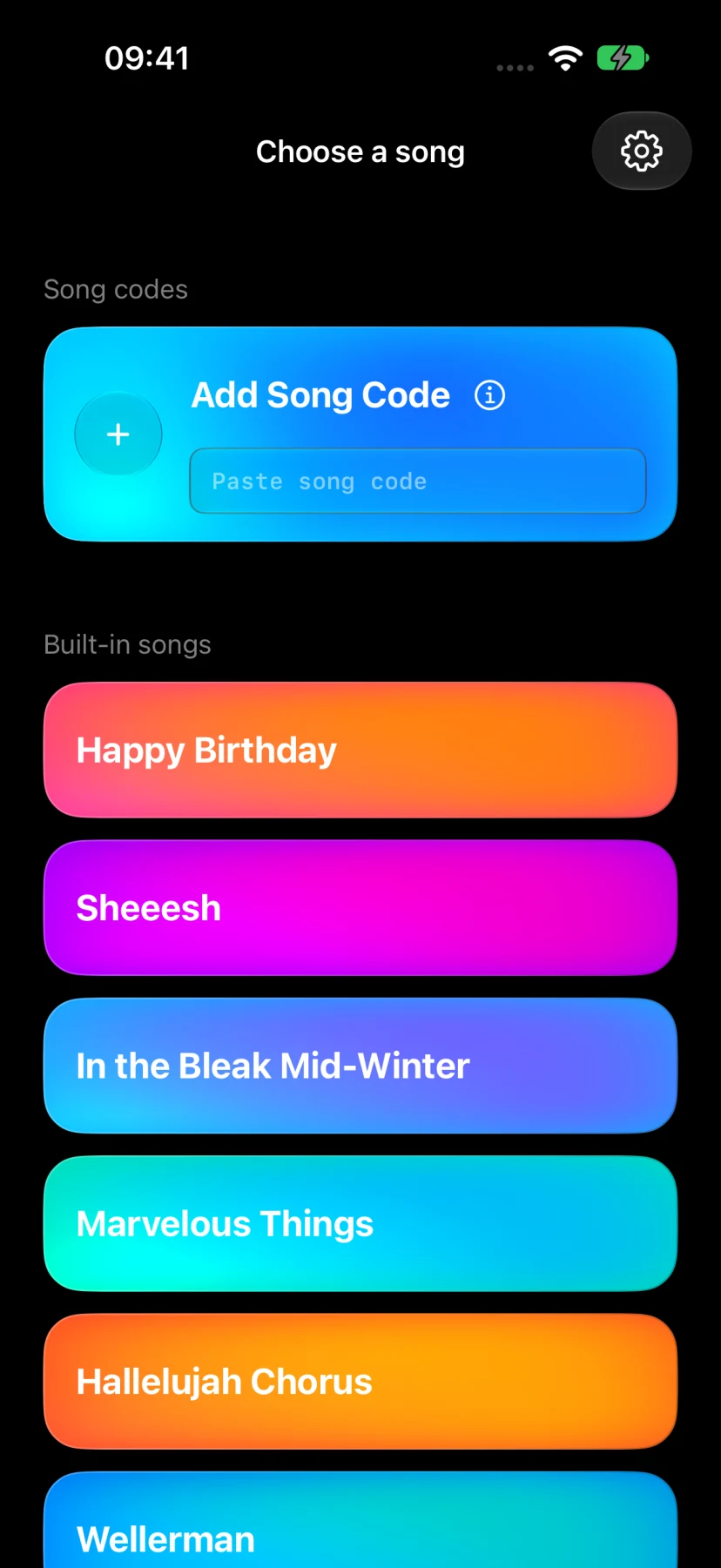
- Open Howli on your phone and go to Choose a song. If you are in My Songs, tap New Song first.
- Paste the code into Add Song Code, check the song preview, then tap Sing it.
Hear each part, follow the pitch and lyric cues, and record your layers. Our harmony recording guide takes you through the next steps.
Using the browser editor? Copy the finished code to your phone, then paste it into the Howli app to sing and record.
How do I create and share a code?
On your phone
Write in Howli
Write notes and lyrics for your vocal parts in Howli on iPhone or Android. Save your arrangement, then choose Copy song code on the completion screen.
Paste the complete code into a message for another singer. They can import it and record their own performance.
In your browser
Write or import a file
Open the free browser song editor. Write your parts, import a MIDI or MusicXML file, or paste an existing code to edit a copy.
Check the arrangement, select the tick (✓) button to finish, then Copy song code. Send it to your phone or another singer.
For sheet music, use a MusicXML file. PDF scores and photos are not supported by the browser editor. Use music you have permission to arrange, record and share.
Song code or Duet file?
Share the arrangement
Song code
Send a code when someone wants to sing their own version of your arrangement. It shares the vocal parts, without your audio or video recordings.
Sing together, at different times
Duet file
Record at least one part, choose Invite to duet, and send the .howli file. It includes the arrangement and selected recordings so a friend can add their voice.
Opening the file creates a separate saved version. Copies do not sync automatically. More about Duet.
Song-code questions.
Why isn’t my song code working?
Copy the entire code again, without surrounding message text, and paste it into Add Song Code in the Howli app. If it still is not accepted, check that Howli is up to date and ask the sender for a fresh copy. A .howli attachment is a Duet file: open that file in Howli instead of pasting it. For more help, contact support.
Where can I get a song code?
Ask the person who made the arrangement to share their complete Howli song code, or create your own in the app or browser editor. You can also choose a built-in song in Howli without a code.
Is recording from a song code free?
Imported song codes use the free daily recording allowance. Howli Unlimited removes that limit. Your retained recordings stay free to review, save and share if you reach the allowance or Unlimited ends. Songs written from scratch in Howli have unlimited free practice on the creator’s device. Free practice and Howli Unlimited.